Search button.
Welcome
Workspace Management
Renaming your workspace
What’s The Difference Between A Manager, Team Member, And Collaborator?
Add A Tea m Member To Your Workspace
Project Setup
Renaming your workspace
What’s The Difference Between A Manager, Team Member, And Collaborator?
Add A Tea m Member To Your Workspace
Project Management
Renaming your workspace
What’s The Difference Between A Manager, Team Member, And Collaborator?
Add A Tea m Member To Your Workspace
FAQs
Welcome
Getting StartedGetting Started
For DesignersFor Designers
For DevelopersFor Developers
Frequently Asked QuestionsFrequently Asked Questions
Technical SupportTechnical Support
Disable or Enable Voice and Screen Share for All Users
Adding Videos and Images
Updating Your Profile
Creating an Account
Resetting Your Password
Customising Your Avatar

Adding Videos and Images

Spaces Owners can add their own images to the allocated objects within your space.

You can change and add an image by:

  • Logging into your Spaces account as the Space owner
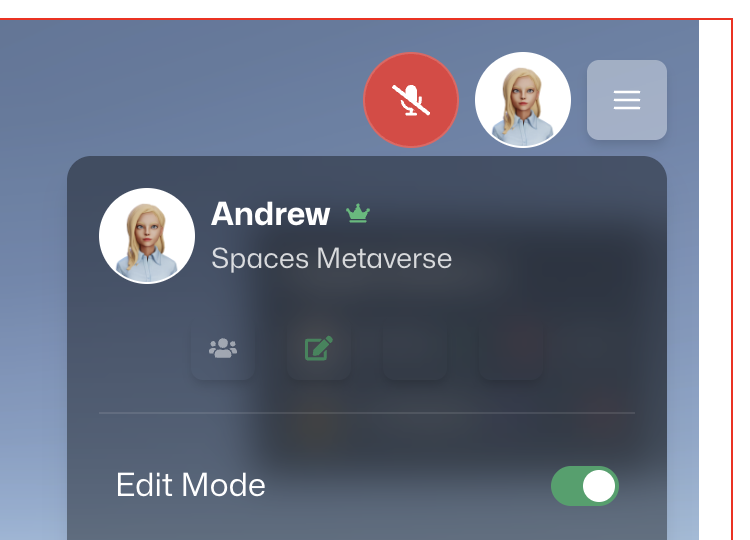
  • Press the menu button on the Space
  • Turn Edit Mode On

‍

Adding an Image

  1. Go to the screen you want to add an image to and press it
  2. A modal will appear

Customising Your Avatar

Resetting Your Password

Creating an Account

Updating Your Profile

Recommended Hardware

Recommended hardware for running Spaces Metaverse

Adding Videos and Images

Spaces Owners can add Images and Videos to their Spaces

Disable or Enable Voice and Screen Share for All Users

Disabling Voice and Screen Share

Related Topics

Copyright © 2025 Spaces Metaverse
Privacy Policy | Terms of Service